
How to Create Cartoon Faces in AI (Photo or Original)
How to create cartoon faces in AI: turn a photo into a cartoon face, or design an original one with a face prompt formula, expression keywords and styles.
There are two ways to create cartoon faces in AI: convert a photo, which keeps a real person's features and redraws them as a cartoon, or design an original face from a text description of its shape, eyes, hair, expression and style. Photos suit profile pictures, gifts and before-and-after posts; original faces suit characters, mascots and stories (no character yet? Generate a random cartoon character first).
For the photo route, GenCartoon's face to cartoon converter takes a selfie and returns a cartoon image that keeps the face, pose and background, and your first conversion is free. For original faces, the prompt formula, expression keywords and styles below work in any AI image or video tool, and they are the core skill of an AI cartoonist.
Two ways to create cartoon faces in AI
| Photo to cartoon | Original design | |
|---|---|---|
| You start from | a clear photo of a face | a text description |
| You get | a cartoon version of a real person or pet | a new face nobody has seen before |
| Best for | profile pictures, gifts, before-and-after posts | characters for videos, mascots, cartoon images |
| On GenCartoon | a cartoon image; first conversion free | a free 4-second test cartoon; reference sheets on paid plans |
Method 1: Turn a photo into a cartoon face
This is the quickest route: there is no prompt to write.
Choose a clear photo
Use a well-lit photo with the face clearly visible, facing the camera or turned slightly. One subject works best: in a group photo each face gets fewer pixels, so crop to one person when the face matters most. Avoid hard shadows, sunglasses and beauty filters.
Upload it to Photo to Cartoon
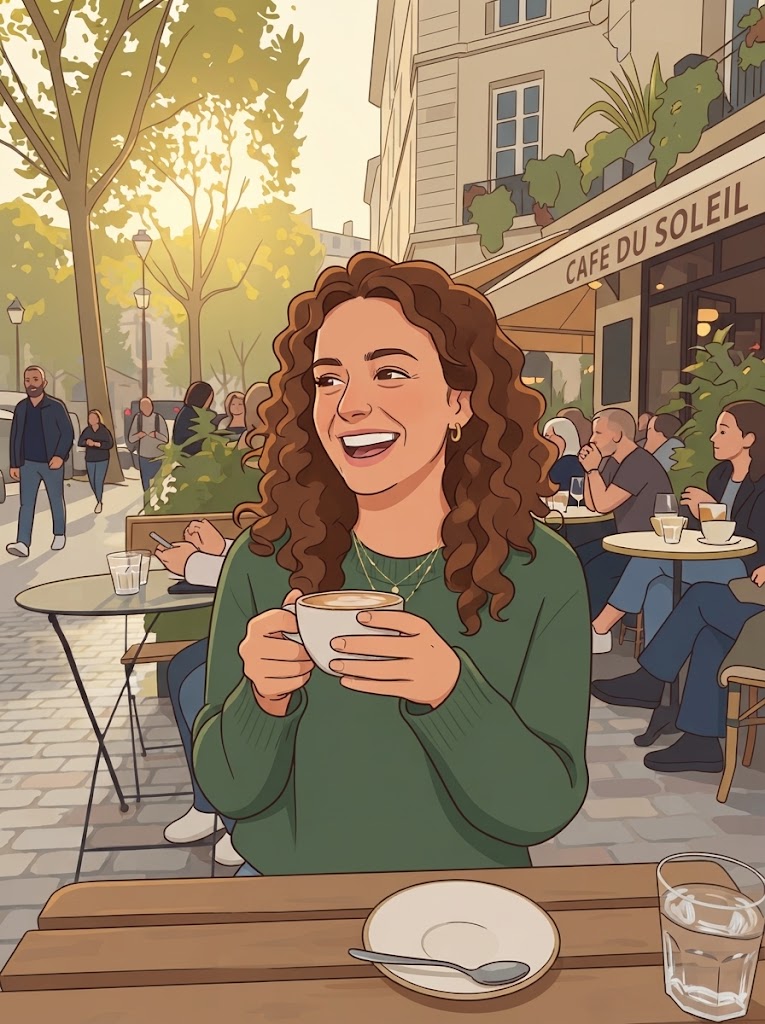
GenCartoon redraws the photo as a cartoon image that keeps the face, pose and background. The default look is vibrant 2D with bold clean outlines and flat cel-shaded colors.
Add a style note (optional)
Type the look you want, such as "3D animated-movie style", "anime" or "comic book". The same photo gives a noticeably different face in each style, so pick the style before you convert: your first conversion is free, and paid plans include more.
Download and share
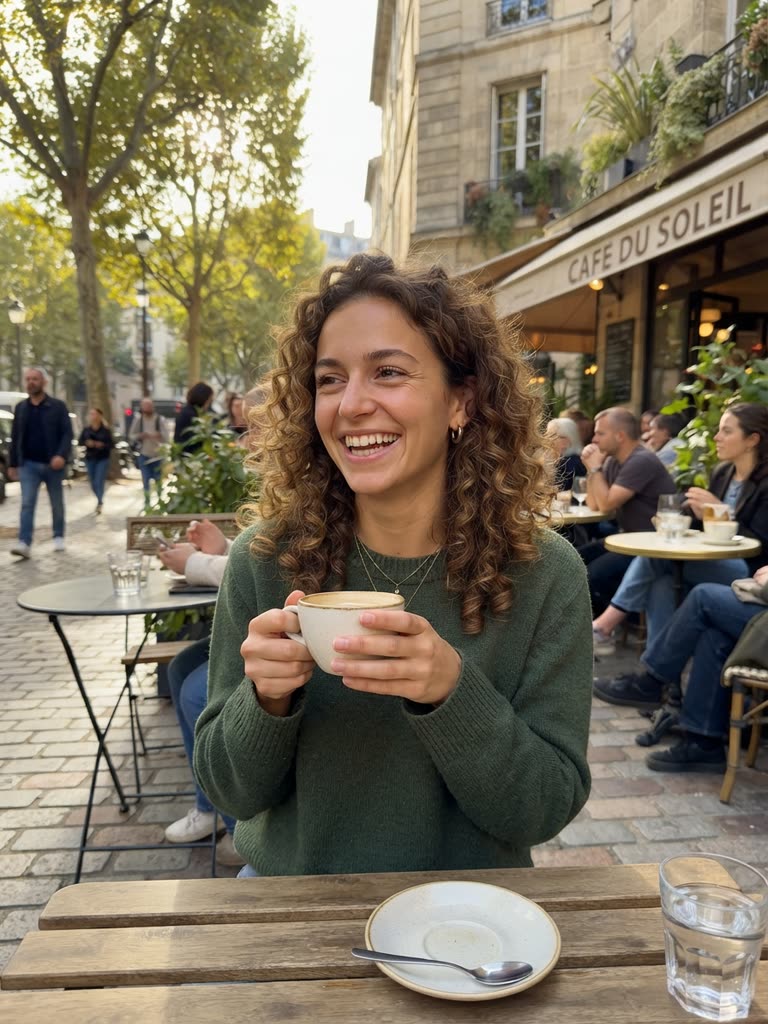
Save the image and use it as a profile picture, a gift or a post. The before-and-after reveal, with the photo first and the cartoon second, is the format behind the AI cartoon trend.
Drag to compare
In this example the converter kept the curly hair, the green sweater, the coffee cup and even the café sign, and redrew them with clean outlines and flat colors. For selfies and keeping the likeness, see turn yourself into a cartoon.
Method 2: Design an original cartoon face
If you are building a character for videos, a mascot or a story, design the face from words.
The face prompt formula
[Face shape] + [Eye style] + [Hair] + [Expression] + [Distinguishing feature] + [Art style]
Example prompts
Young hero:
Close-up portrait of a young boy with a round face, big bright blue eyes, messy brown hair, a confident grin and small freckles, 3D animated-movie style, studio lighting
Fantasy villain:
Close-up of a cartoon sorceress with an angular face, glowing purple eyes, dramatic black hair, a sly smile and dark smoky makeup, classic animated-villain look, moody lighting
Animal:
Close-up of a cartoon golden retriever puppy with a round face, big sparkly brown eyes, a happy open mouth with the tongue out and soft fur, 3D animated-movie style, warm lighting
Robot:
A friendly cartoon robot face with a round head, large LED-screen eyes showing a happy expression and silver panels with teal accents, clean 3D design
Using a face prompt on GenCartoon
A face prompt is the start of a character description. Test it free in the cartoon maker, where every account can make a free 4-second cartoon; ask for a close-up to see the face move. On a paid plan, the character creator draws the character as a reference sheet so the same face returns in every Studio scene. To grow a face into a full character with a silhouette, palette and signature prop, see how to design a cartoon character.
Creating expressive cartoon faces
Expression is what brings a cartoon face to life, and it is where viewers connect with a character. Add one set of keywords to a prompt:
| Expression | Keywords to add |
|---|---|
| Happy, joyful | wide smile, sparkling eyes, raised cheeks, laughing |
| Sad | watery eyes, downturned mouth, drooping brows, a tear rolling down one cheek |
| Angry, determined | furrowed brows, clenched jaw, intense eyes, gritted teeth |
| Surprised, shocked | wide eyes, open mouth, raised eyebrows, jaw dropped |
| Thinking, curious | one eyebrow raised, hand on chin, squinting, quizzical look |
| Mischievous, playful | sly grin, half-closed eyes, smirk, a wink |
One expression per prompt reads better than a mix. In a video prompt, describe the change instead: her wide smile drops into a startled, open-mouthed stare.
Popular cartoon face styles
3D animated-movie
Smooth, rounded features, big expressive eyes and soft lighting: the look many people call "Pixar-style 3D". It is the most versatile style and works for all ages.
Anime and manga
Large eyes, small noses and stylized hair. Best for action, romance and fantasy stories.
Caricature
Exaggerated features for comedy: a bigger nose, a bigger grin, bigger hair. Good for birthday gifts and roasts; ask before you caricature someone else.
Chibi
Oversized heads, tiny bodies, huge eyes and simplified features. Ideal for stickers, emotes and merchandise.
Classic 2D cartoon
Bold outlines, simple shapes, flat colors and big expressions. It is also the default look of GenCartoon's photo converter.
FAQ
How do I turn my face into a cartoon with AI?
Upload a clear, front-facing photo to a photo-to-cartoon converter. GenCartoon's Photo to Cartoon returns a cartoon image that keeps your face, pose and background, in a bold 2D look or a style you type, such as anime or comic book. Your first conversion is free.
Is there a free AI cartoon face generator?
Yes, to start: GenCartoon's first photo-to-cartoon conversion is free, and paid plans include more. To try an original face instead, describe it in a free 4-second cartoon, a vertical clip at 480p with a small watermark that is usually ready in about a minute.
Which photo gives the best cartoon face?
A well-lit photo of one clear face, seen from the front or slightly turned, without heavy filters, sunglasses or hard shadows. Group photos work too, but each face gets fewer pixels, so crop to one person when that face matters most.
Can my cartoon face become an animated character?
Yes, on a paid plan. Your cartoon can become a recurring character in GenCartoon's Studio, where it is drawn as a reference sheet and animated in scenes for episodes and short movies. The free tier turns photos into cartoon images, not videos.
GenCartoon Team
GenCartoon Team makes AI cartoons and writes about characters, scenes and animation workflows.
Make your own cartoon
Describe an idea in one sentence and watch it animate: a free 4-second cartoon to start, no card needed. Paid plans make clips of up to 8 seconds in HD 720p, without the watermark.
Cartoonize my photo freeRelated guides
How to Turn a Photo Into a Cartoon With AI (Step by Step)
Turn a photo into a cartoon with AI, step by step: which photos work, which styles keep the likeness, how to fix drifted details. First conversion is free.
ReadAI Cartoon Maker for Kids: A Parent and Teacher Guide
How parents and teachers make cartoons for and with kids using AI: kid-safe prompts, bedtime stories as cartoons, classroom ideas and the 13+ account rule.
ReadAI Cartoon Generator Guide: How It Works & Best Prompts
How an AI cartoon generator turns a sentence or a photo into a cartoon video, what is really free, and the prompts and styles that get results.
Read